Importing data


Data tidying and importing

Data Science with R

Reading rectangular data into R

Reading delimited files

library(tidyverse)
  • read_csv() - comma delimited files
  • read_csv2() - semicolon separated files (common in countries where , is used as the decimal place)
  • read_tsv() - tab delimited files
  • read_delim() - reads in files with any delimiter
  • read_fwf() - fixed width files

Reading Excel spreadsheets

library(readxl)
  • read_excel() - read xls or xlsx files

Reading and writing CSV files

Reading data

nobel <- read_csv(file = "data/nobel.csv")
Rows: 1000 Columns: 19
── Column specification ────────────────────────────────────
Delimiter: ","
chr (17): first_name, last_name, born, died, born_countr...
dbl  (2): id, year

ℹ Use `spec()` to retrieve the full column specification for this data.
ℹ Specify the column types or set `show_col_types = FALSE` to quiet this message.

Reading data

nobel
# A tibble: 1,000 × 19
      id first_name     last_name   born  died  born_country
   <dbl> <chr>          <chr>       <chr> <chr> <chr>       
 1   160 Jacobus H.     van 't Hoff 1852… 3/1/… the Netherl…
 2   569 Sully          Prudhomme   1839… 9/7/… France      
 3   293 Emil           von Behring 1854… 3/31… Prussia (no…
 4   462 Henry          Dunant      1828… 10/3… Switzerland 
 5     1 Wilhelm Conrad Röntgen     1845… 2/10… Prussia (no…
 6   463 Frédéric       Passy       1822… 6/12… France      
 7   464 Élie           Ducommun    1833… 12/7… Switzerland 
 8   465 Albert         Gobat       1843… 3/16… Switzerland 
 9   294 Ronald         Ross        1857… 9/16… India       
10   161 Emil           Fischer     1852… 7/15… Prussia (no…
# ℹ 990 more rows
# ℹ 13 more variables: born_country_code <chr>,
#   born_city <chr>, died_country <chr>,
#   died_country_code <chr>, died_city <chr>, gender <chr>,
#   year <dbl>, category <chr>, overall_motivation <chr>,
#   motivation <chr>, organization_name <chr>,
#   organization_city <chr>, organization_country <chr>

Writing data

Write a file:

df <- tribble(
  ~x, ~y,
  1,  "a",
  2,  "b",
  3,  "c"
)

write_csv(df, file = "data/df.csv")

Reading data back

Read it back in to inspect:

read_csv("data/df.csv")
Rows: 3 Columns: 2
── Column specification ────────────────────────────────────
Delimiter: ","
chr (1): y
dbl (1): x

ℹ Use `spec()` to retrieve the full column specification for this data.
ℹ Specify the column types or set `show_col_types = FALSE` to quiet this message.
# A tibble: 3 × 2
      x y    
  <dbl> <chr>
1     1 a    
2     2 b    
3     3 c    

Suppressing messages

```{r}
#| message: false
read_csv("data/df.csv")
```
# A tibble: 3 × 2
      x y    
  <dbl> <chr>
1     1 a    
2     2 b    
3     3 c    

Variable names

Data with bad names

edibnb_bad_names <- read_csv("data/edibnb-bad-names.csv")
names(edibnb_bad_names)
 [1] "ID"                   "Price"               
 [3] "neighbourhood"        "accommodates"        
 [5] "Number of bathrooms"  "Number of Bedrooms"  
 [7] "n beds"               "Review Scores Rating"
 [9] "Number of reviews"    "listing_url"         

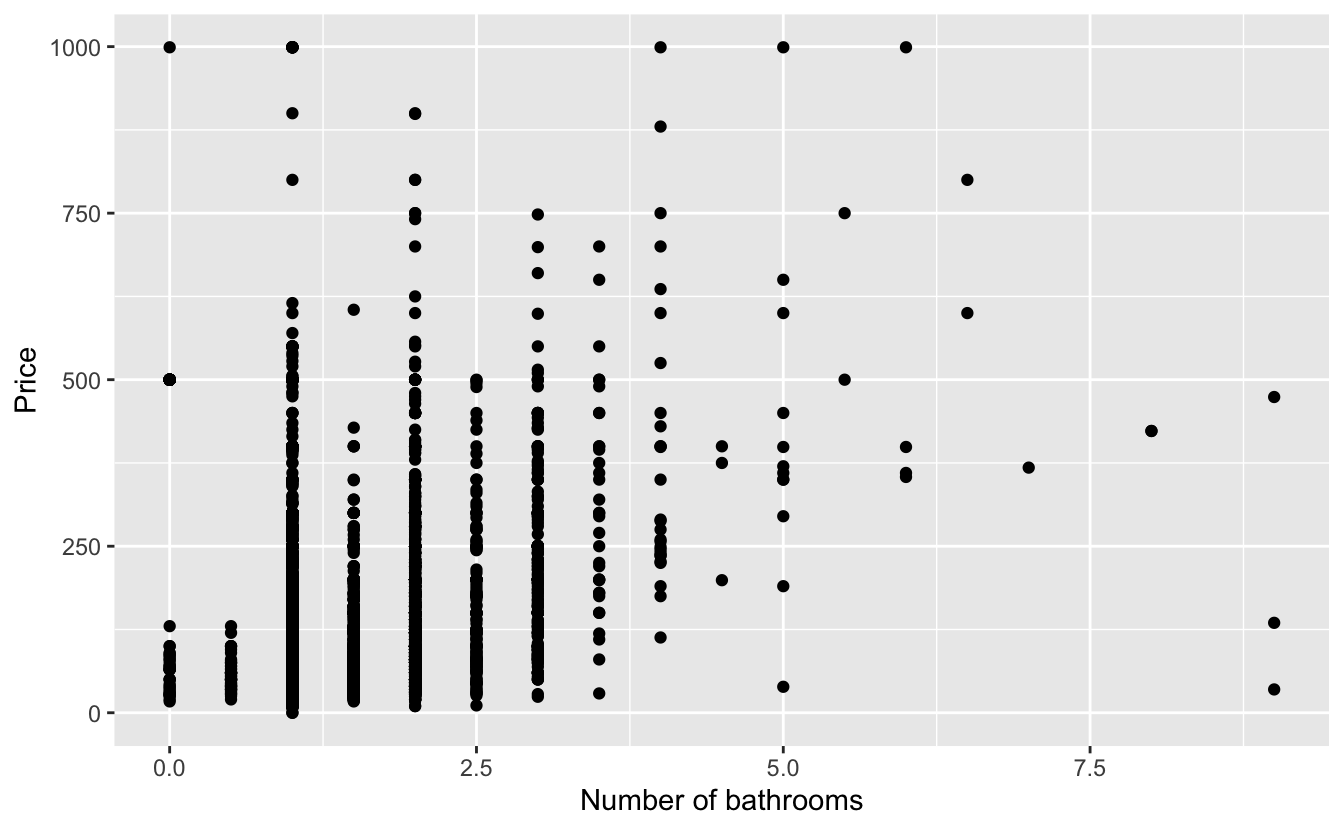
… but R doesn’t allow spaces in variable names

ggplot(
  edibnb_bad_names, 
  aes(x = Number of bathrooms, y = Price)
  ) +
  geom_point()
Error: <text>:3:18: unexpected symbol
2:   edibnb_bad_names, 
3:   aes(x = Number of
                    ^

Option 1 - Quote column names

ggplot(
  edibnb_bad_names, 
  aes(x = `Number of bathrooms`, y = Price)
  ) +
  geom_point()

Option 2 - Define column names

edibnb_col_names <- read_csv(
  "data/edibnb-bad-names.csv",
  col_names = c(
    "id", "price", "neighbourhood", "accommodates", 
    "bathroom", "bedroom", "bed", "review_scores_rating", 
    "n_reviews", "url"
  )
)
names(edibnb_col_names)
 [1] "id"                   "price"               
 [3] "neighbourhood"        "accommodates"        
 [5] "bathroom"             "bedroom"             
 [7] "bed"                  "review_scores_rating"
 [9] "n_reviews"            "url"                 

Option 3 - Format column names to snake_case

library(janitor)

edibnb_clean_names <- read_csv("data/edibnb-bad-names.csv") |>
  janitor::clean_names()
names(edibnb_clean_names)
 [1] "id"                   "price"               
 [3] "neighbourhood"        "accommodates"        
 [5] "number_of_bathrooms"  "number_of_bedrooms"  
 [7] "n_beds"               "review_scores_rating"
 [9] "number_of_reviews"    "listing_url"         

Variable types

Variable types

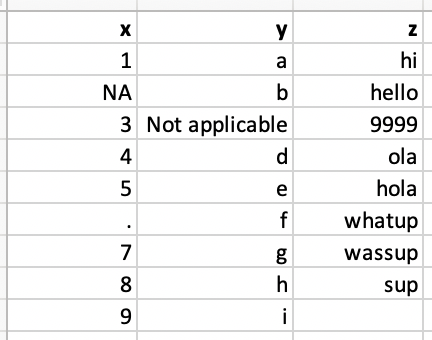
Which type is x? Why?

read_csv("data/df-na.csv")
# A tibble: 9 × 3
  x     y              z     
  <chr> <chr>          <chr> 
1 1     a              hi    
2 <NA>  b              hello 
3 3     Not applicable 9999  
4 4     d              ola   
5 5     e              hola  
6 .     f              whatup
7 7     g              wassup
8 8     h              sup   
9 9     i              <NA>  

Option 1. Explicit NAs

read_csv(
  "data/df-na.csv", 
  na = c("", "NA", ".", "9999", "Not applicable")
)
# A tibble: 9 × 3
      x y     z     
  <dbl> <chr> <chr> 
1     1 a     hi    
2    NA b     hello 
3     3 <NA>  <NA>  
4     4 d     ola   
5     5 e     hola  
6    NA f     whatup
7     7 g     wassup
8     8 h     sup   
9     9 i     <NA>  
Option 2. Specify column types

read_csv(
  "data/df-na.csv", 
  col_types = list(col_double(), col_character(), col_character())
  )
Warning: One or more parsing issues, call `problems()` on your data
frame for details, e.g.:
  dat <- vroom(...)
  problems(dat)
# A tibble: 9 × 3
      x y              z     
  <dbl> <chr>          <chr> 
1     1 a              hi    
2    NA b              hello 
3     3 Not applicable 9999  
4     4 d              ola   
5     5 e              hola  
6    NA f              whatup
7     7 g              wassup
8     8 h              sup   
9     9 i              <NA>  

Column types for read_csv()

type function data type
col_character() character
col_date() date
col_datetime() POSIXct (date-time)
col_double() double (numeric)
col_factor() factor
col_guess() let readr guess (default)
col_integer() integer
col_logical() logical
col_number() numbers mixed with non-number characters
col_numeric() double or integer
col_skip() do not read
col_time() time

Reading Excel spreadsheets

Reading data

nobel <- read_excel(path = "data/nobel.xlsx")
nobel
# A tibble: 1,000 × 19
      id first_name     last_name  born  died               
   <dbl> <chr>          <chr>      <chr> <dttm>             
 1   160 Jacobus H.     van 't Ho… 1852… 1911-03-01 00:00:00
 2   569 Sully          Prudhomme  1839… 1907-09-07 00:00:00
 3   293 Emil           von Behri… 1854… 1917-03-31 00:00:00
 4   462 Henry          Dunant     1828… 1910-10-30 00:00:00
 5     1 Wilhelm Conrad Röntgen    1845… 1923-02-10 00:00:00
 6   463 Frédéric       Passy      1822… 1912-06-12 00:00:00
 7   464 Élie           Ducommun   1833… 1906-12-07 00:00:00
 8   465 Albert         Gobat      1843… 1914-03-16 00:00:00
 9   294 Ronald         Ross       1857… 1932-09-16 00:00:00
10   161 Emil           Fischer    1852… 1919-07-15 00:00:00
# ℹ 990 more rows
# ℹ 14 more variables: born_country <chr>,
#   born_country_code <chr>, born_city <chr>,
#   died_country <chr>, died_country_code <chr>,
#   died_city <chr>, gender <chr>, year <dbl>,
#   category <chr>, overall_motivation <chr>,
#   motivation <chr>, organization_name <chr>, …

Spreadsheets with “bad” names

edibnb_bad_names <- read_excel("data/edibnb-bad-names.xlsx")

names(edibnb_bad_names)
 [1] "ID"                   "Price"               
 [3] "neighbourhood"        "accommodates"        
 [5] "Number of bathrooms"  "Number of Bedrooms"  
 [7] "n beds"               "Review Scores Rating"
 [9] "Number of reviews"    "listing_url"         

Option 1. Define column names

edibnb_col_names <- read_excel(
  "data/edibnb-bad-names.xlsx",
  col_names = c(
    "id", "price", "neighbourhood", "accommodates", "bathroom", 
    "bedroom", "bed", "review_scores_rating", "n_reviews", "url"
  )
)

names(edibnb_col_names)
 [1] "id"                   "price"               
 [3] "neighbourhood"        "accommodates"        
 [5] "bathroom"             "bedroom"             
 [7] "bed"                  "review_scores_rating"
 [9] "n_reviews"            "url"                 

Option 2. Format column names to snake_case

edibnb_clean_names <- read_excel("data/edibnb-bad-names.xlsx") |>
  janitor::clean_names()

names(edibnb_clean_names)
 [1] "id"                   "price"               
 [3] "neighbourhood"        "accommodates"        
 [5] "number_of_bathrooms"  "number_of_bedrooms"  
 [7] "n_beds"               "review_scores_rating"
 [9] "number_of_reviews"    "listing_url"         

Spreadsheets with NAs

read_excel("data/df-na.xlsx")
# A tibble: 9 × 3
  x     y              z     
  <chr> <chr>          <chr> 
1 1     a              hi    
2 NA    b              hello 
3 3     Not applicable 9999  
4 4     d              ola   
5 5     e              hola  
6 .     f              whatup
7 7     g              wassup
8 8     h              sup   
9 9     i              <NA>  

Option 1. Explicit NAs

read_excel(
  "data/df-na.xlsx", 
  na = c("", "NA", ".", "9999", "Not applicable")
)
# A tibble: 9 × 3
      x y     z     
  <dbl> <chr> <chr> 
1     1 a     hi    
2    NA b     hello 
3     3 <NA>  <NA>  
4     4 d     ola   
5     5 e     hola  
6    NA f     whatup
7     7 g     wassup
8     8 h     sup   
9     9 i     <NA>  

Option 2. Specify column types

read_excel(
  "data/df-na.xlsx", 
  col_types = c("numeric", "text", "text")
  )
Warning: Expecting numeric in A3 / R3C1: got 'NA'
Warning: Expecting numeric in A7 / R7C1: got '.'
# A tibble: 9 × 3
      x y              z     
  <dbl> <chr>          <chr> 
1     1 a              hi    
2    NA b              hello 
3     3 Not applicable 9999  
4     4 d              ola   
5     5 e              hola  
6    NA f              whatup
7     7 g              wassup
8     8 h              sup   
9     9 i              <NA>  

Column types for read_excel()

type function data type
"skip" do not read
"guess" let readxl guess (default)
"logical" logical
"numeric" numeric
"date" POSIXct (date-time)
"text" character
"list" a list of length 1 vectors

Other types of data

Other types of data

  • googlesheets4: Google Sheets
  • arrow: parquet files
  • DBI, along with a database specific backend (e.g. RMySQL, RSQLite, RPostgreSQL etc): allows you to run SQL queries against a database and return a data frame
  • rvest: web scraping
  • haven: SPSS, Stata, and SAS files
  • jsonline: JSON
  • xml2: xml
  • httr: web APIs
  • sparklyr: data loaded into spark